
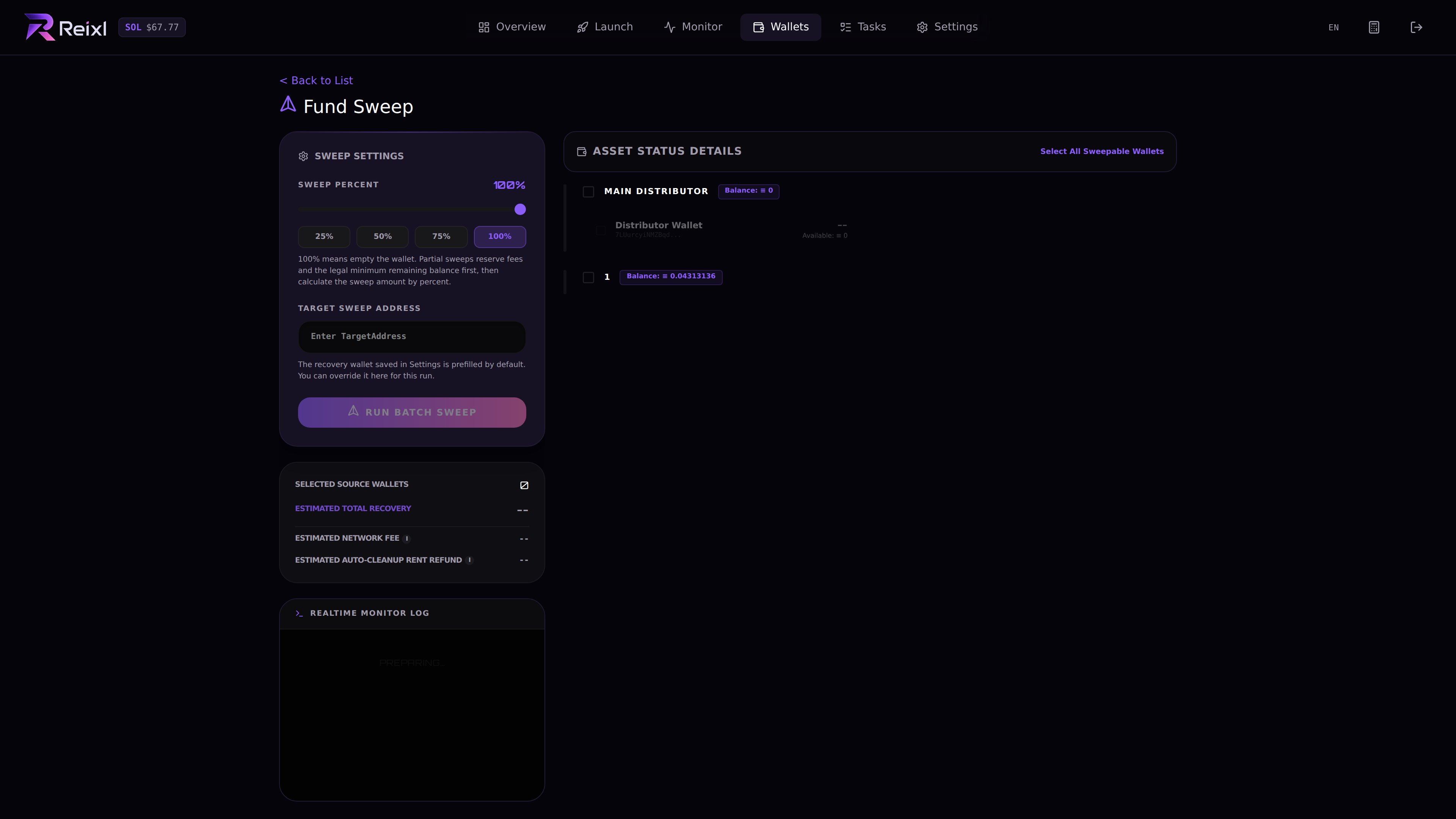
Sweep is for collecting leftover SOL after a run. It does not sell tokens and it does not close a live task. Sweep SOL

Sweep only after

  • the launch or task is finished
  • sells are done, if needed
  • token positions were checked
  • balances were refreshed
  • the group no longer needs SOL

Steps

  1. Open the group or task detail.
  2. Check whether wallets still hold tokens.
  3. Sell first if needed.
  4. Choose source wallets.
  5. Confirm the target wallet.
  6. Choose the sweep percentage, from 1% to 100%.
  7. Use 25%, 50%, 75%, or 100% shortcuts when they fit.
  8. Review the estimate.
  9. Start the sweep.
  10. Wait for the result.
  11. Refresh balances.

Estimate fields

The sweep page can show estimated transfer amount, network fees, and automatic rent cleanup. Treat the estimate as a review step before sending.

Result details

After sweep, check swept, skipped, transfer failed, reclaimed, nothing to reclaim, and reclaim failed items. Open failed rows before retrying.

If sweep is partial

Open the sweep result and check which wallet did not finish. Refresh, then retry only when you understand what is left.